The Rabbit
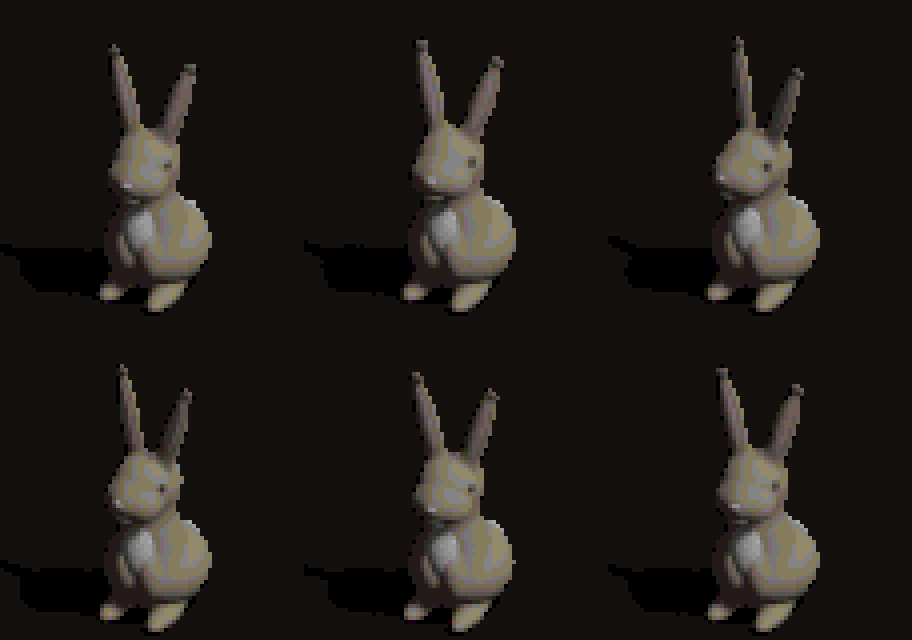
The pond has one neighbor: a rabbit who sits beside the rabbit hole. In part 2 he got Cain's job and Cain's spot. This part gives him his own body.
1What kind of rabbit
There were three options on the table: a wild cottontail sitting up, the White Rabbit from Alice in a waistcoat with a pocket watch, or an old robed rabbit as a stand-in for Cain the town elder. I went with the plain cottontail. The duck is a plain rubber duck with a sword, not a character in a costume, and the rabbit should be just as plainly a rabbit.
2What we're replacing
Every townsperson in Diablo is one strip of frames from one angle. Cain is 25 frames, each 96 by 96 pixels, of an old man in a robe swaying slightly: about 60 pixels tall, facing the camera, his shadow falling to the left. The game loops the strip forever. Whatever replaces him has to be the same: 25 frames, same frame size, feet on the same spot.

3One model, the duck's camera
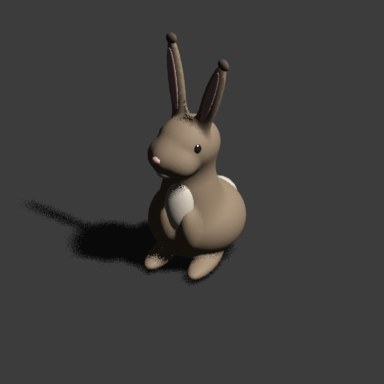
The duck was built in Blender, rendered from the same camera angle Blizzard used, and reduced to the game's palette. The rabbit uses the same camera, the same sun and the same shadow trick, so the two look like they belong in one world. The model is made of metaballs: overlapping blobs that melt into one smooth surface. A big round rump, a narrower chest leaning back, long flat hind feet, front paws tucked up, a pale belly, a white puff of a tail, and two long ears.
The first render had problems you'd expect from a first try: the ears floated above the head, the eyes faced forward like a cartoon instead of sitting on the sides of the head the way a rabbit's do, and the hind feet looked like separate pebbles. The fix for the ears was to make them part of the same metaball family as the head, so they grow out of the skull instead of hovering over it. Then the two ears overlapped into a single spike from the camera's angle, so they got splayed into a V.
4At game size
A render like that is about 350 pixels tall. In the game the rabbit gets about 60. The converter shrinks each frame, pins the feet to the spot Cain's feet use, tones the colors down to sit in Diablo's dark palette, and matches every pixel to the nearest of the town's 256 colors. The shadow becomes the palette's darkest color. Then it packs the frames into the same file format as Cain's sprite, under the same name, and the game loads it the same way it loaded the original.
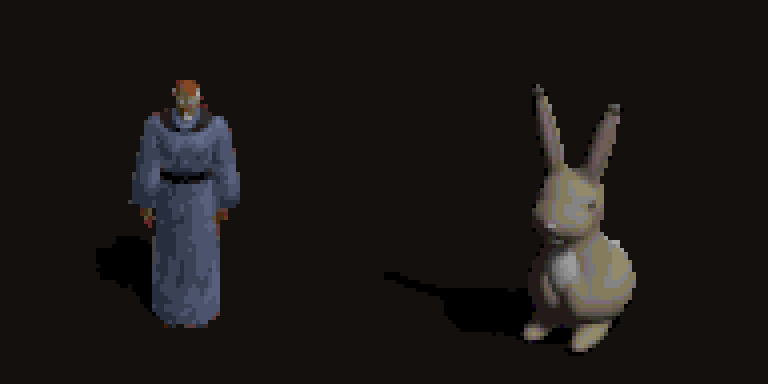
The idle loop does three things in 25 frames: the rabbit breathes the whole way through, turns his head toward the path the duck walks up and back again, and flicks one ear near the end.
One surprise: the game doesn't play Cain's 25 frames in order. It plays them in a scrambled back-and-forth sequence written for the way Cain sways, which hid the ear flick entirely. The rabbit now plays his frames straight through.
5His words, in my voice
The shareware switches townspeople's chatter off, so the rabbit borrows the way quest characters talk in the original game: a speech that scrolls up the screen while it's read aloud. The game already had an unused slot for one, so his speech took it over, and a few lines of code make it play when the duck walks up.
I read it myself, which meant building a better way to record. Part 1 had a script that beeps, records a fixed number of seconds and cleans up the take. This time it got a teleprompter: a full-screen page with the script in big type and the current line lit, with a countdown and a timer. Partway through setting it up I wanted a way to stop before the time ran out, so the page now sends signals to the recorder through a tiny local server: stepping past the last line ends the take, and each line change gets a timestamp. The game then sizes the scroll to the recording, so the text keeps pace with the voice without any tuning.
6Recording the result
To show it here I wanted a video of the duck walking up with the sound, without clicking through a recording app. OBS has a remote control built in, so a short script drives it: it builds its own scene, records the game's picture and only the game's sound, mutes the microphone, records, and puts everything back the way it was. Getting there took three tries. Capturing just the game window recorded black (the game runs full screen), requesting OBS's list of running apps crashed it, and capturing the whole display plus the game's audio on its own is what worked.
7The hole, twice
The way down was still a dirt patch. A character is a sprite that floats over the map; a hole is part of the ground, so it has to become map tiles. Same Blender camera again, with the ground set to render as nothing so only the dirt shows. Then the render is laid over the town's own ground, so its edges match what's around it, cut into the small shaped pieces the game builds its ground from, and appended to the end of the town's tile files, leaving every original tile where it was.
The first one went straight into the game, and it was wrong: a neat little hole in a ring of dirt, one tile across, smaller than the path leading to it. It had been checked to see that it worked, not whether it looked right, and I hadn't seen it before it went in. A rabbit's burrow is a mouth dug in under a heap of the earth that came out of it, with the ground around it churned up and scattered with clods.
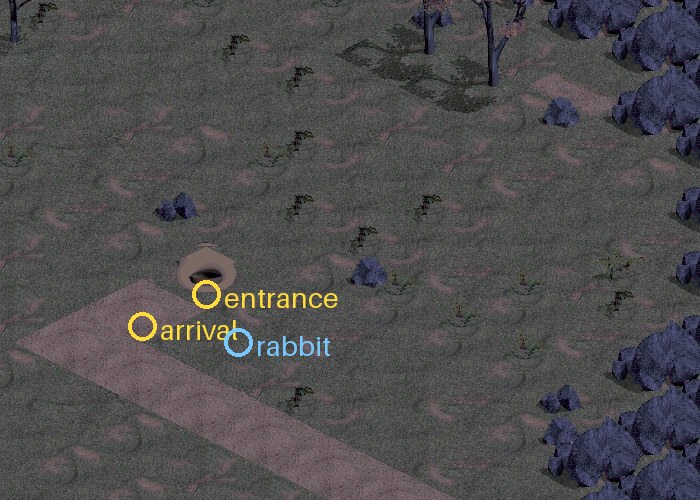
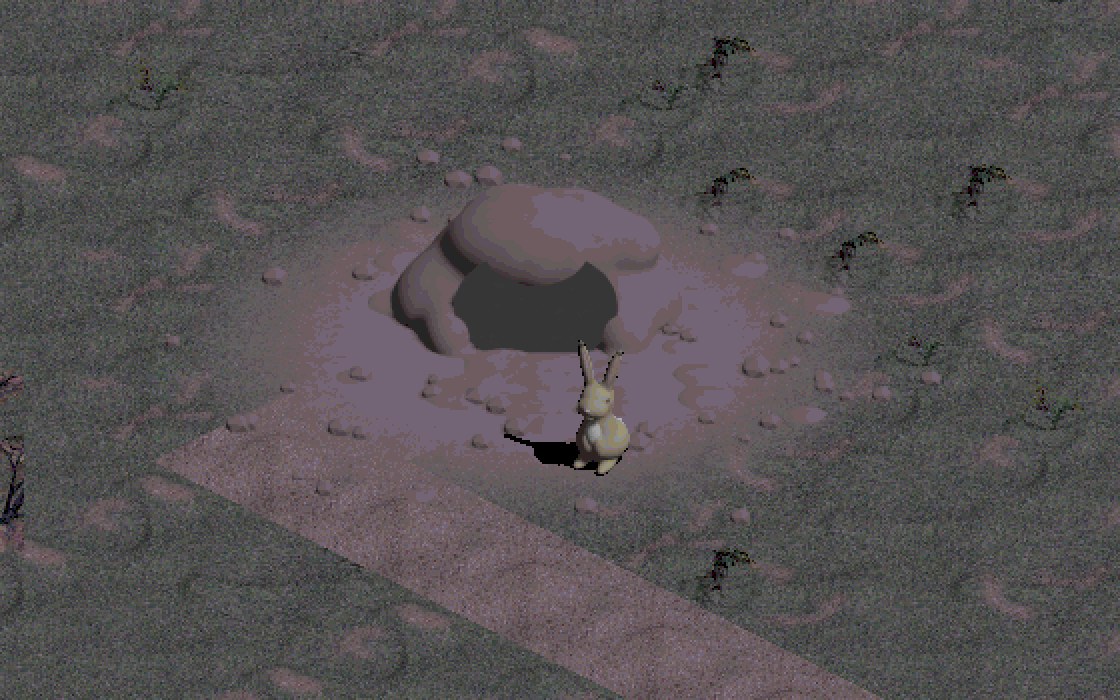
The second time went through the map tool before the game. The burrow got a spoil heap with the mouth in its face, a tongue of spilled dirt in front, churned ground thinning out at the edges, and clods kicked across it. Instead of one tile over grass, it's laid over the town exactly as it looks there, path end included, across a 5 by 5 block, and only the tiles the dirt touches get new art. Three passes: the first showed the heap clipped at the block's edge and the churned dirt too faint to see, the second fixed those, and the third scaled it up and drew the rabbit in for scale. I saw that one before it went in.
池には隣人がひとりいます。ウサギの穴のそばに座っているウサギです。第2回で、彼は Cain の役目と Cain の場所をもらいました。今回は、彼に自分の体を作ります。
1どんなウサギにするか
候補は三つありました。後ろ足で座る野生のワタオウサギ、チョッキを着て懐中時計を持った『不思議の国のアリス』の白ウサギ、そして町の長老 Cain の代わりとして、ローブを着た年寄りのウサギ。私はふつうのワタオウサギを選びました。アヒルは剣を持ったふつうのゴムのアヒルで、衣装を着たキャラクターではありません。ウサギも同じように、ただのウサギであるべきです。
2置き換える相手
Diablo の町の人は、みな一つの角度から見たフレームの帯一本でできています。Cain は96×96ピクセルのフレームが25枚で、ローブを着た老人がわずかに揺れています。背の高さは約60ピクセル、カメラの方を向いていて、影は左に落ちます。ゲームはこの帯を延々とループします。代わりに入るものも同じでなければなりません。25フレーム、同じフレームサイズ、足は同じ位置です。
3一つのモデル、アヒルのカメラ
アヒルは Blender で作り、Blizzard が使ったのと同じカメラアングルでレンダリングして、ゲームのパレットに落としました。ウサギも同じカメラ、同じ太陽、同じ影の工夫を使うので、二匹は同じ世界にいるように見えます。モデルはメタボールでできています。重なり合った塊が溶け合って、一つのなめらかな表面になるものです。大きく丸いお尻、後ろに反った細めの胸、長く平たい後ろ足、たたんだ前足、白っぽいお腹、白い綿毛のようなしっぽ、そして長い耳が二本。
最初のレンダリングには、初めての試みらしい問題がありました。耳が頭の上に浮いていて、目はウサギらしく頭の横にあるのではなく漫画のように前を向いていて、後ろ足は別々の小石のように見えました。耳は、頭と同じメタボールのグループに入れて直しました。こうすると耳は頭の上に浮かず、頭から生えてきます。すると今度は、カメラの角度から見て二本の耳が重なり、一本のとげのようになったので、V字に開きました。
4ゲームのサイズで
あのようなレンダリングは高さが約350ピクセルあります。ゲームの中でウサギがもらえるのは約60ピクセルです。変換ツールは各フレームを縮小し、足を Cain の足と同じ位置に固定し、色を Diablo の暗いパレットになじむように抑えて、すべてのピクセルを町の256色のうち一番近い色に合わせます。影はパレットで一番暗い色になります。それからフレームを Cain のスプライトと同じファイル形式、同じ名前で詰め込みます。ゲームは元のファイルと同じように、それを読み込みます。
待機ループは25フレームで三つのことをします。ウサギはずっと呼吸していて、アヒルが歩いてくる道の方へ頭を向けてまた戻し、終わり近くで片耳をぴくりと動かします。
一つ意外なことがありました。ゲームは Cain の25フレームを順番どおりに再生していなかったのです。Cain の揺れ方に合わせて書かれた、行ったり来たりの入り組んだ順番で再生していて、そのせいで耳の動きがまったく見えなくなっていました。今は、ウサギのフレームを最初から最後まで順番に再生しています。
5彼のセリフを、私の声で
シェアウェア版では町の人のおしゃべりがオフになっているので、ウサギは元のゲームでクエストのキャラクターが話す方法を借ります。読み上げられながら、画面を上へスクロールしていくセリフです。ゲームにはもともと使われていないセリフの枠が一つあったので、それを彼のセリフにして、アヒルが近づくと再生されるように数行のコードを足しました。
読み上げは私自身がしました。そのために、もっといい録音の方法を作ることになりました。第1回では、ビープ音を鳴らし、決まった秒数だけ録音して、テイクを整えるスクリプトを使いました。今回はそこにテレプロンプターを加えました。台本を大きな文字で表示して今の行を光らせる全画面のページで、カウントダウンとタイマーもついています。準備の途中で、時間切れの前に止める方法がほしくなったので、今はこのページが小さなローカルサーバーを通して録音側に信号を送ります。最後の行を過ぎるとテイクが終わり、行が変わるたびにタイムスタンプが記録されます。そのあとゲームがスクロールの長さを録音に合わせるので、調整しなくても文字が声と同じペースで進みます。
6結果を録画する
ここで見せるために、録画アプリをクリックして操作しなくても、アヒルが歩いてくる様子を音つきで録画したいと思いました。OBS にはリモート操作の機能が組み込まれているので、短いスクリプトで操作します。スクリプトは自分用のシーンを作り、ゲームの映像とゲームの音だけを取り込み、マイクをミュートして録画し、すべてを元に戻します。そこまでに三回かかりました。ゲームのウィンドウだけを取り込むと真っ黒に録画され(ゲームは全画面で動いています)、OBS に実行中のアプリの一覧を要求すると OBS が落ちました。うまくいったのは、画面全体と、ゲームの音だけを別に取り込む方法です。
7穴を、二回
下へ降りる入口は、まだただの土の地面でした。キャラクターはマップの上に浮かぶスプライトですが、穴は地面の一部なので、マップのタイルにしなければなりません。ここでも同じ Blender のカメラを使い、地面は何も描かないように設定して、土だけが写るようにしました。そのレンダリングを町の元の地面に重ねて、ふちがまわりになじむようにし、ゲームが地面を組み立てるための小さな形のピースに切り分けて、町のタイルファイルの最後に追加しました。元のタイルはすべてそのままです。
一回目の穴はそのままゲームに入り、間違っていました。土の輪の中にこぢんまりした小さな穴があるだけで、幅は1タイル、そこへ続く道より小さかったのです。動くかどうかは確認されていましたが、見た目が正しいかどうかは確認されておらず、私も入る前に見ていませんでした。ウサギの巣穴とは、掘り出した土の山の下に口を開けていて、まわりの地面が掘り返され、土くれが散らばっているものです。
二回目は、ゲームより先にマップツールを通しました。巣穴には掘り出した土の山ができ、その正面に口が開き、手前には土がこぼれ出し、掘り返された地面はふちに向かって薄れ、そこに土くれが散らばっています。草の上に1タイル置くのではなく、道の終わりも含めて町のその場所の見た目そのままに5×5のブロックに重ね、土がかかるタイルにだけ新しい絵を入れました。三回試しました。一回目は土の山がブロックのふちで切れていて、掘り返された土も薄すぎて見えませんでした。二回目でそれを直し、三回目で拡大して、大きさがわかるようにウサギを描き入れました。これは入る前に私が見ました。
Want the next one?
New posts by email, now and then. Nothing else.