Bust Symmetry
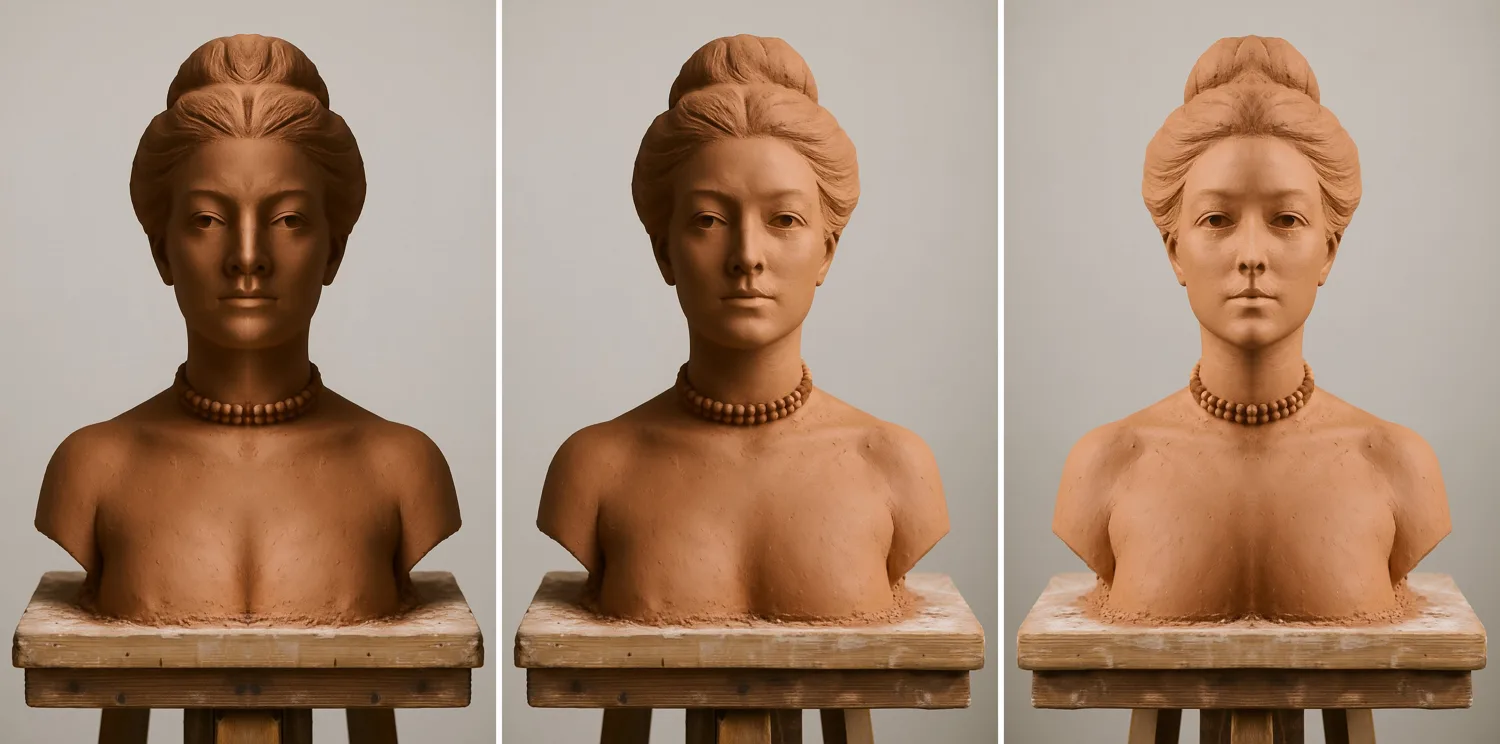
The tool is live at bust-symmetry.dydomite.com. It runs in the phone's browser, and photos never leave the phone.
1Menan's bust
My wife Menan is a ceramic artist, and she's sculpting a bust in clay, working from a drawing on an easel beside it. A face is the hardest thing to get symmetric, because everyone is an expert at looking at faces. One eye a little high or one cheek a little full and the whole thing reads as off, even when you can't say why.
My first idea was big: three cameras, front, side and top, feeding something that measures her symmetry. My second was the question I try to ask about everything: what's the smallest version of this?
2Borrowing the duck's overlay
In the Diablo duck project, I fit a 3D duck to photos of my rubber duck with a script that traced both outlines and overlaid them: white where they agreed, green where only the photo had duck, magenta where only the model did. A bust's symmetry is the same problem with one picture: lay the photo over its own mirror image and color where they disagree.
So the smallest version was one phone photo of the front, in a web page that flips it and draws the overlay. I built it in Next.js with Claude Code, put it on a dydomite.com subdomain on Vercel, and about ten minutes after the idea it was on my phone.
3An engineer's app
It worked, and it was an engineer's app for sure: four view modes, a midline slider, a tilt slider, a background threshold with an Auto button, and an "Even out lighting" checkbox. That last one mattered. Menan's studio light comes from a window, and a cheek in shadow would read as "different" from a cheek in light. The fix compares each pixel with the average of its neighborhood instead of comparing raw brightness, so the comparison follows the shape.
Leaving the page to take a photo was too many taps, so I added a live camera with the overlay drawn as you aim. On my phone the controls ended up below the picture, out of reach, and the lighting fix amplified the camera's grain into streaks. Both got fixed, and it was still too fiddly. What I wanted was: take a shot straight on, and the rest is handled.
4One shot, the rest handled
The rework took most of the controls away. You take the photo, and the code searches for the center line: it tries line positions and small tilts on a small copy of the photo and keeps the fold where the two halves match best. On the example the line lands on the nose with no adjustment. The sliders are still there, folded under "Adjust the center line," for the times it misses.
The views became pictures instead of modes: the bust built from its left half twice, as shot, from its right half twice, and the color overlay. Then I added a button you hold down to see one side doubled, and let go to snap back, because flicking between two states is how you see a difference instantly. Looking at a static overlay, you have to work it out.
5My face, doubled
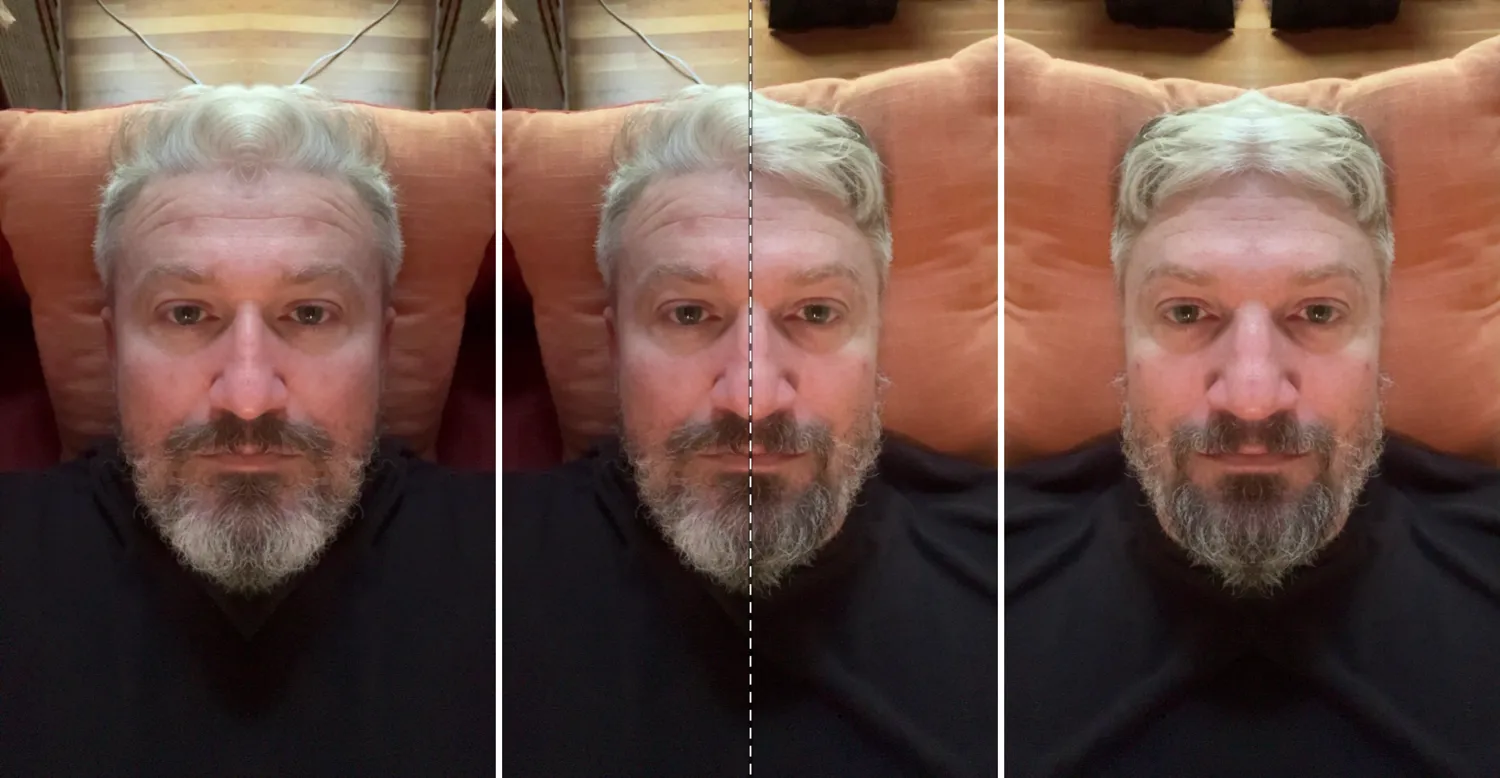
I tested it on the face I had: mine, in a selfie. The center line landed where it should. But one doubled face came out too narrow and the other too wide, and both looked a little fishy. That turned out to be mostly the camera. If the phone isn't square to the face, even by a few degrees, the half that's turned away shrinks, and doubling it makes a narrow face while doubling the other makes a wide one. Holding the phone at arm's length makes it worse, because a close wide lens bulges whatever is nearest.
One photo can't tell camera angle from a lopsided face. That's a limit of the method, not a bug I could fix.
6What the research says
I looked for research on this and found more than I expected:
- Leonardo did it first. His notebooks have a section called "How the mirror is the master of painters": compare your picture with the subject's reflection in a flat mirror. Painters still flip their canvas to see it fresh.
- A flip is a prompt, not a measurement. A 2006 study showed people faces with one eye shifted, normal and mirrored. Mirroring changed what they judged as distorted, not how sensitive they were. Some of what jumps out in a flip is your eyes, not the clay.
- Doubled half-faces are over a century old. They go back to 1902 and were popularized in 1933. The known problems are features the seam invents, and hair, shadows and background confusing the result.
- Distance matters most. At a foot away, a nose looks about 30% larger relative to the cheekbones. At five feet the distortion is negligible.
- Small turns flip the answer. In clinical photos, a head turned 5 degrees can reverse which side looks asymmetric. Clinics that need a true answer scan in 3D and color the distance between the face and its mirror image.
- Sculptors have done the 3D version. A 2019 paper scanned a clay head and compared it with a symmetry-corrected model to find what to re-sculpt. The artist apps I could find only flip or mirror; none of them detect the center line or overlay a source picture.
Two things changed after that. Flip became the main button, with the doubled views kept as illustrations. And I stopped worrying about my selfie, because that isn't how I'd shoot a bust anyway.
7Five times zoom
When I photograph something I care about, I stand back and use the 5x lens. Phones expose each of their back cameras to the browser separately, so the camera screen now has the same chips as the Camera app: 0.5x, 1x, 2x and 5x. 2x on our phones is a center crop of the main camera, which is also how Apple's Camera app does it. The camera screen opens on the lens used last, since Menan might prefer 2x.
The example image used to be a cartoon head drawn in code, which looked silly. The new one came from OpenAI's image model, seeded with a frame from a video Menan sent me of her bust: same terracotta, stand and choker, with a new face. One of the two outputs came back as a content-policy error, flagged for the bust's bare chest.
8Her source picture
That video also showed what I'd been missing: the drawing on the easel is her source. A symmetry check tells her whether the two sides agree. Her source tells her whether the face is the right face.
So she can add her source picture once, and it's stored on her phone. Google's face-landmark model, running on the phone, locates the eyes in both pictures, and the code scales and rotates the source so its eyes sit on the bust's eyes. I wasn't sure a model trained on photos of people would return landmarks for a clay face at all. It did for both: the generated example, and Menan's bust in her video, where it detected the bust rather than the drawing behind it. In a test with the same bust turned 5 degrees and shrunk 20%, the overlay came out as one crisp image. If no face is detected, the page names the picture that failed and leaves the source for her to drag and pinch into place.
9One rule for every button
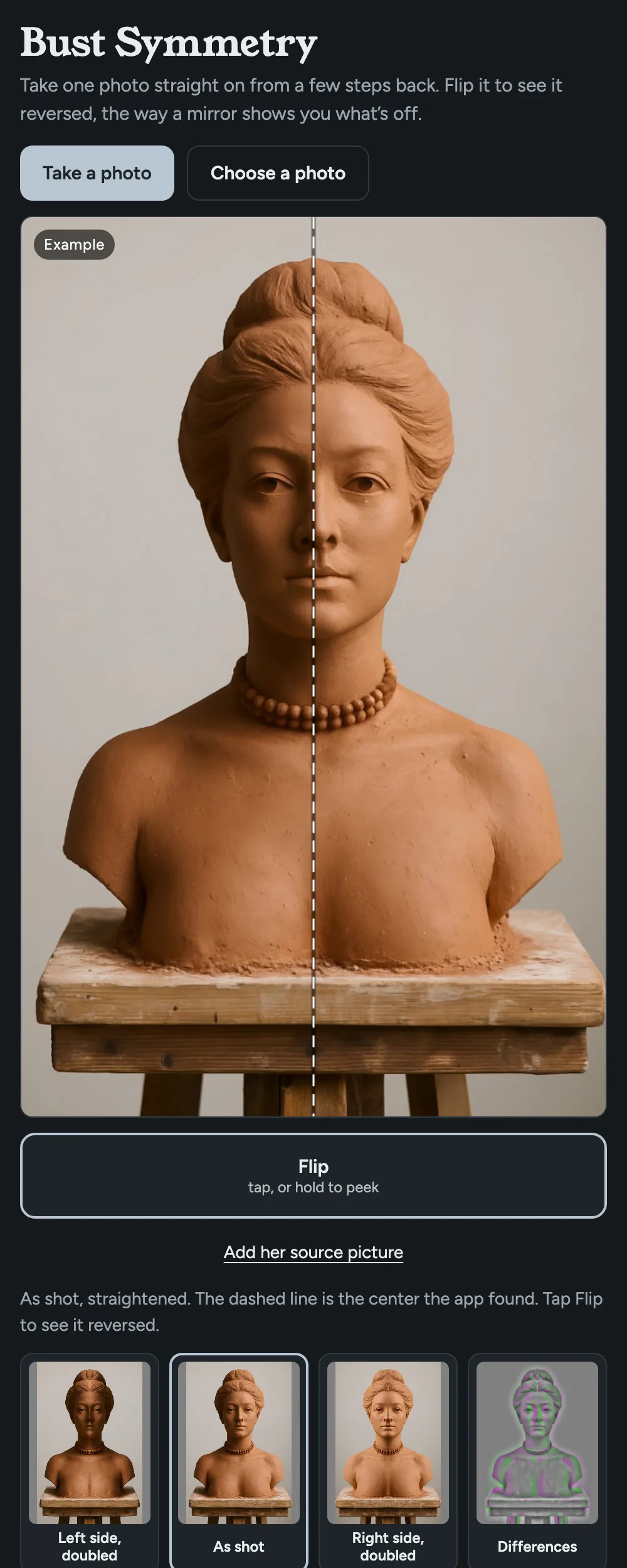
The source started as a 50% onion skin, and I wanted 100% too, and maybe off, without crowding the screen. Where it landed is one rule for every control: tap and it stays, hold to peek, let go and it snaps back.
[ Flip ]   [ 50% | 100% ]
   Change source picture
Tapping 100% on and off is a blink comparison, the trick astronomers used to find what moved between two photographs of the same sky: whatever jumps is the difference. 50% is the onion skin. Tapping the lit one again hides it, so there's no Off button.
10Next
Menan hasn't used it yet, and she's the test that counts. Whatever she does now to check symmetry, stepping back, squinting, a mirror, is what this should speed up. If photos ever stay ambiguous, the bigger version is a 3D scan compared against its own mirror, which takes camera angle out of it entirely.
Sources: Leonardo, Notebooks, item 529 · Seyama and Nagayama 2006 · chimeric faces, Frontiers 2018 · selfie distance, JAMA Facial Plastic Surgery 2018 · 2D vs 3D asymmetry · clay head scan, FME Transactions 2019
このツールは bust-symmetry.dydomite.com で公開しています。スマホのブラウザで動き、写真がスマホの外に出ることはありません。
1Menan の胸像
妻の Menan は陶芸家で、いま粘土で胸像を作っています。横のイーゼルに立てた絵を見ながらの制作です。顔は、左右対称にするのがいちばん難しいものです。誰もが、顔を見ることにかけては専門家だからです。片目が少し高い、片方の頬が少しふくらんでいる。それだけで、理由は言えなくても、全体がどこかおかしく見えます。
最初に思いついたのは大がかりなものでした。正面、横、上の三台のカメラから、対称性を測る仕組みに映像を送る。次に浮かんだのは、私が何についても問うようにしている質問でした。これのいちばん小さい版は何だろう?
2アヒルのオーバーレイを借りる
Diablo のアヒルのプロジェクトでは、ゴムのアヒルの写真に 3D のアヒルを合わせるのに、両方の輪郭をなぞって重ねるスクリプトを使いました。一致するところは白、写真にだけアヒルがあるところは緑、モデルにだけあるところはマゼンタ。胸像の対称性は、同じ問題を一枚の写真で解くことです。写真を自分自身の鏡像に重ねて、食い違うところに色をつければいい。
だから、いちばん小さい版は、正面から撮ったスマホの写真一枚と、それを反転してオーバーレイを描くウェブページでした。Claude Code を使って Next.js で作り、Vercel 上の dydomite.com のサブドメインに置きました。思いついてから十分ほどで、もう私のスマホで動いていました。
3エンジニアのアプリ
ちゃんと動きました。そして、まぎれもなくエンジニアのアプリでした。表示モードが四つ、中心線のスライダー、傾きのスライダー、「Auto」ボタン付きの背景しきい値、それに「Even out lighting」(明るさをならす)のチェックボックス。最後のものは大事でした。Menan のアトリエの光は窓から入ります。影になった頬は、光の当たった頬と「違う」と判定されてしまいます。そこで、生の明るさを比べるのではなく、各ピクセルをその周囲の平均と比べるようにしました。こうすると、比較が形に沿うようになります。
写真を撮るためにページを離れるのはタップが多すぎたので、ライブカメラを加えて、構えている間にオーバーレイが描かれるようにしました。私のスマホでは操作部が写真の下にきて指が届かず、明るさの補正はカメラのノイズを増幅して筋にしてしまいました。どちらも直しましたが、それでもまだ手間がかかりすぎました。私がほしかったのは、正面から一枚撮れば、あとは全部やってくれるものでした。
4一枚撮れば、あとはおまかせ
作り直しで、操作部のほとんどを取り除きました。写真を撮ると、コードが中心線を探します。写真の小さなコピーの上で、線の位置とわずかな傾きをいくつも試し、左右の半分がいちばんよく一致する折り目を残します。見本の写真では、何も調整しなくても線が鼻の上にきます。スライダーはまだあって、外れたときのために「Adjust the center line」(中心線を調整)の下にしまってあります。
表示はモードではなく、絵になりました。左半分を二つ合わせた胸像、撮ったまま、右半分を二つ合わせたもの、そして色のオーバーレイ。さらに、押している間だけ片側を二つ合わせた姿が見え、指を離すと元に戻るボタンを加えました。二つの状態をぱっと切り替えると、違いがすぐに見えるからです。止まったオーバーレイを見るときは、頭で考えないといけません。
5二つに合わせた私の顔
手元にあった顔、つまり自撮りした自分の顔で試しました。中心線は正しい位置にきました。でも、二つに合わせた顔の片方は細すぎ、もう片方は広すぎて、どちらもどこか怪しげでした。原因はほとんどカメラでした。スマホが顔に対してまっすぐ向いていないと、たとえ数度でも、向こうを向いている側の半分が縮みます。それを二つに合わせると細い顔になり、反対側を合わせると広い顔になります。腕をのばしてスマホを持つと、さらに悪くなります。近くから撮る広角レンズは、いちばん近いものをふくらませるからです。
一枚の写真では、カメラの角度と顔のゆがみを区別できません。これはこの方法の限界で、私が直せるバグではありません。
6研究では
このテーマの研究を探してみると、思っていたより多く見つかりました。
- 最初にやったのはレオナルド。彼の手稿には「鏡はいかにして画家の師であるか」という項があります(筆者訳)。自分の絵を、平らな鏡に映った対象と比べなさい、という内容です。画家はいまでもキャンバスを反転させて、新鮮な目で見直します。
- 反転は手がかりであって、測定ではない。2006年の研究で、片目をずらした顔を、そのままの向きと鏡像で見せました。鏡像にすると、人がゆがんでいると判断するものは変わりましたが、ゆがみへの敏感さは変わりませんでした。反転して目に飛びこんでくるものの一部は、粘土ではなく自分の目のせいなのです。
- 半分の顔を二つ合わせる手法は、百年以上前からある。始まりは1902年で、1933年に広まりました。知られている問題は、継ぎ目が作り出してしまう特徴と、髪や影や背景が結果を狂わせることです。
- いちばん効くのは距離。1フィート(約30cm)の距離では、鼻が頬骨に対して約30%大きく見えます。5フィート(約1.5m)離れれば、ゆがみは無視できるほどになります。
- 少しの回転で答えが逆になる。臨床写真では、頭が5度回っているだけで、どちらの側が非対称に見えるかが逆になることがあります。正確な答えが必要なクリニックは、3Dでスキャンし、顔とその鏡像との距離を色で表します。
- 彫刻家は3D版をやっている。2019年の論文では、粘土の頭部をスキャンし、対称に補正したモデルと比べて、どこを彫り直すかを見つけています。私が見つけられたアーティスト向けのアプリは、反転か鏡像にするだけでした。中心線を検出したり、参考の絵を重ねたりするものはありませんでした。
そのあと、二つのことを変えました。「Flip」(反転)をメインのボタンにして、二つに合わせた表示は説明用の絵として残しました。そして、自撮りのことは気にしなくなりました。胸像をあんなふうに撮ることはないからです。
75倍ズーム
大事なものを撮るとき、私は少し下がって5倍のレンズを使います。スマホは背面のカメラをそれぞれ別々にブラウザに見せるので、カメラ画面にはカメラアプリと同じ 0.5x、1x、2x、5x のボタンをつけました。私たちのスマホの 2x はメインカメラの中央を切り出したもので、Apple のカメラアプリも同じやり方です。Menan は 2x のほうが好きかもしれないので、カメラ画面は前回使ったレンズで開きます。
見本の画像は、もとはコードで描いた漫画のような頭で、間が抜けて見えました。新しいものは OpenAI の画像モデルで作りました。Menan が送ってくれた胸像の動画の一コマをもとにしています。同じテラコッタ、同じ台、同じチョーカーで、顔だけが新しいものです。二つの出力のうち一つは、胸像の裸の胸が引っかかって、コンテンツポリシーのエラーで返ってきました。
8彼女の参考の絵
その動画で、私が見落としていたことにも気づきました。イーゼルの絵が、彼女の参考の絵なのです。対称性のチェックは、左右が合っているかを教えてくれます。参考の絵は、その顔が正しい顔かどうかを教えてくれます。
そこで、参考の絵を一度追加すれば、彼女のスマホに保存されるようにしました。スマホ上で動く Google の顔ランドマークモデルが両方の絵の目を見つけ、コードが参考の絵を拡大縮小・回転して、その目が胸像の目に重なるようにします。人の写真で学習したモデルが、粘土の顔にランドマークを返すかどうか、自信はありませんでした。でも、どちらにも返しました。生成した見本と、動画に映った Menan の胸像です。動画では、後ろの絵ではなく胸像のほうを検出しました。同じ胸像を5度回して20%縮めたテストでは、オーバーレイはくっきりした一枚の像になりました。顔が検出されなかったときは、どの絵で失敗したかをページが示し、参考の絵は彼女がドラッグやピンチで合わせられるようにしておきます。
9すべてのボタンに一つのルール
参考の絵は最初、50%のオニオンスキンでした。100%もほしいし、オフもあったほうがいいかもしれない。でも画面は混ませたくない。落ち着いたのは、すべての操作に共通の一つのルールです。タップするとそのまま、長押しでちらっと見て、離すと元に戻る。
[ Flip ]   [ 50% | 100% ]
   Change source picture
100% をタップしてオンとオフを切り替えるのは、ブリンク比較です。天文学者が、同じ空を撮った二枚の写真から動いたものを見つけるのに使った方法で、跳ねて見えるものが違いです。50% はオニオンスキン。点灯しているほうをもう一度タップすると消えるので、オフのボタンはありません。
10次に
Menan はまだ使っていません。彼女が使ってみることが、いちばん大事なテストです。いま彼女が対称性を確かめるためにしていること、つまり下がって見る、目を細める、鏡を使う、といったことを速くするのがこのアプリの役目です。もし写真ではいつまでも判断がつかないなら、もっと大きな版として、3Dスキャンをその鏡像と比べる方法があります。そうすれば、カメラの角度はまったく関係なくなります。
出典: レオナルド『手稿』529項 · Seyama・Nagayama 2006 · キメラ顔、Frontiers 2018 · 自撮りの距離、JAMA Facial Plastic Surgery 2018 · 2Dと3Dの非対称性 · 粘土の頭部のスキャン、FME Transactions 2019
Want the next one?
New posts by email, now and then. Nothing else.